Kotadaila: A Script Font for Web Design
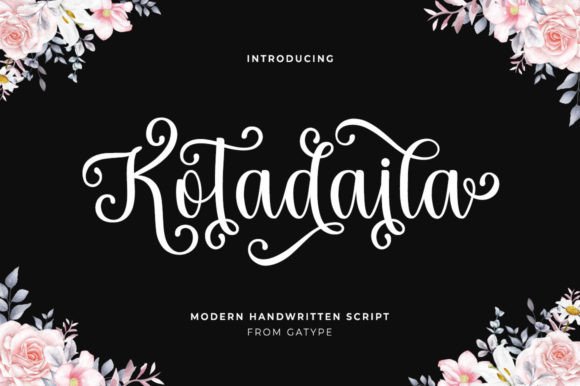
As a web designer, I’m always on the lookout for fonts that bring both personality and professionalism to a site. Kotadaila has quickly become one of my go-to choices for adding a touch of elegance without sacrificing clarity. Its cursive style and elegant characters make it ideal for headers, hero sections, and other digital elements where visual impact matters.
Testing Kotadaila in a Hero Section
I recently used Kotadaila on a boutique online store’s homepage. The font stood out beautifully against a bold background image, drawing attention to the main headline. It felt modern yet timeless, which aligned perfectly with the brand’s aesthetic. The font’s fluid lines gave the design a sense of movement, making the page feel more dynamic and engaging.
One thing I noticed was how well Kotadaila scaled across different screen sizes. On mobile devices, it remained legible and didn’t lose its charm. That’s crucial for responsive design, where every element needs to work seamlessly across platforms.
Using Kotadaila for Call-to-Action Buttons
I also experimented with Kotadaila on a call-to-action button for a course sales page. The font added a unique flair that made the button stand out without being overwhelming. It worked especially well when paired with a simple sans serif font for the surrounding text, creating a balanced visual hierarchy.
However, I found that using Kotadaila for longer text on buttons wasn’t the best choice. The script style can be a bit too ornate for small, high-traffic areas. For those, I recommend a cleaner typeface that prioritizes readability over aesthetics.
Pairing Kotadaila with Other Fonts
Font pairing is essential in web design, and Kotadaila pairs exceptionally well with a range of other typefaces. I often use it alongside a modern sans serif like Montserrat or a classic serif like Georgia. This combination creates a clean, professional look while allowing the script font to shine as a focal point.
For editorial-style websites, pairing Kotadaila with a serif font adds a touch of sophistication. On more minimalist sites, a sans serif helps keep the design from feeling too busy. Either way, the font adapts well and enhances the overall visual language of the site.
Readability on Different Backgrounds
Another consideration when using Kotadaila is how it performs against various backgrounds. On light backgrounds, the font maintains good contrast and clarity. But on dark backgrounds, I noticed that some of the finer details could get lost, especially at smaller sizes.
To combat this, I adjusted the font size and added a subtle drop shadow. This helped improve legibility without compromising the font’s beauty. It’s a small tweak, but it makes a big difference in user experience, especially on mobile devices.
Applying Kotadaila to Digital Branding
Kotadaila is a great fit for digital branding projects, especially for businesses that want to convey creativity and craftsmanship. I’ve used it in logo designs, social media graphics, and email templates, and it consistently delivers a polished, cohesive look.
One project that stood out was a creative portfolio website. Kotadaila was used for the header and section titles, giving the site a refined, artistic feel. It complemented the rest of the design without overpowering it, which is exactly what I look for in a display font.
Considerations for Web Use
While Kotadaila is a beautiful font, it’s important to use it strategically. As a script font, it works best for short phrases, headings, and decorative accents rather than long paragraphs of body text. Using it for large blocks of text can reduce readability and make the site feel less accessible.
Also, I recommend checking the font’s licensing before using it on client projects or commercial websites. Kotadaila is PUA encoded, which means it’s easy to access all the characters and alternates. This is a huge plus for designers who want full control over their typography.
If you’re looking for a font that adds character to your digital projects without sacrificing usability, Kotadaila is an excellent choice. It brings a level of refinement that can elevate any website’s visual identity, making it a valuable addition to any web designer’s toolkit.